This example is taken from
B. Fornberg, Practical Guide to Pseudo-Spectral Methods
see Section 4.2 and figures 4.2-1 and 4.2-2 in that section.
We solve
with periodic boundaries and initial condition
and
The characteristic variables are
and
#%config InlineBackend.figure_format='svg'
from matplotlib.collections import PolyCollection,LineCollection
from numpy import pi,linspace,sin,cos,exp,round,zeros,arange,real
from numpy.fft import fft,ifft,fftfreq
from matplotlib.pyplot import figure
# Set up grid and differentiation matrix:
N = 256; h = 2/N; x = -1.0 + h*arange(1,N+1) - h/2;
t = 0.0; dt = h/10.0
tmax = 7.0; tplot = 0.1;
plotgap = int(round(tplot/dt)); dt = tplot/plotgap;
nplots = int(round(tmax/tplot))
u0 = lambda x: exp(-1600*(x - 0.25)**2)
v0 = lambda x: 0.5*exp(-1600*(x - 0.25)**2)
c = (x < 0.0)*(1.0) + (x >= 0.0)*(0.5)
u, v = u0(x), v0(x)
# Interpolate characteristic variables (CHECK)
w1 = 0.5*u0(x+c*dt) - 0.5*v0(x+c*dt)/c
w2 = 0.5*u0(x-c*dt) + 0.5*v0(x-c*dt)/c
uold = w1 + w2
vold = c*(w2 - w1)
# wave numbers
k = 2 * pi * fftfreq(N,h)
ik = 1j * k
# Time-stepping by leap-frog formula
data = []; data.append(list(zip(x, u)))
tdata = []; tdata.append(0.0)
for i in range(1,nplots+1):
for n in range(plotgap):
t = t + dt
u_hat, v_hat = fft(u), fft(v)
ux_hat, vx_hat = ik * u_hat, ik * v_hat
ux, vx = real(ifft(ux_hat)), real(ifft(vx_hat))
unew = uold + 2.0 * dt * vx
vnew = vold + 2.0 * dt * c**2 * ux
uold = u; u = unew;
vold = v; v = vnew;
data.append(list(zip(x, u)))
tdata.append(t);
fig = figure(figsize=(12,10))
ax = fig.add_subplot(111,projection='3d')
#poly = PolyCollection(data, closed=False, facecolors='white', edgecolors='red')
poly = LineCollection(data)
poly.set_alpha(0.9)
ax.add_collection3d(poly, zs=tdata, zdir='y')
ax.plot([0,0],[0,7],'k-')
ax.set_xlabel('x'); ax.set_ylabel('t'); ax.set_zlabel('u')
ax.set_xlim3d(-1, 1); ax.set_ylim3d(0, 7); ax.set_zlim3d(-1.5, 1.5)
ax.view_init(40,-50)
ax.set_box_aspect(aspect=(0.5, 1, 0.1))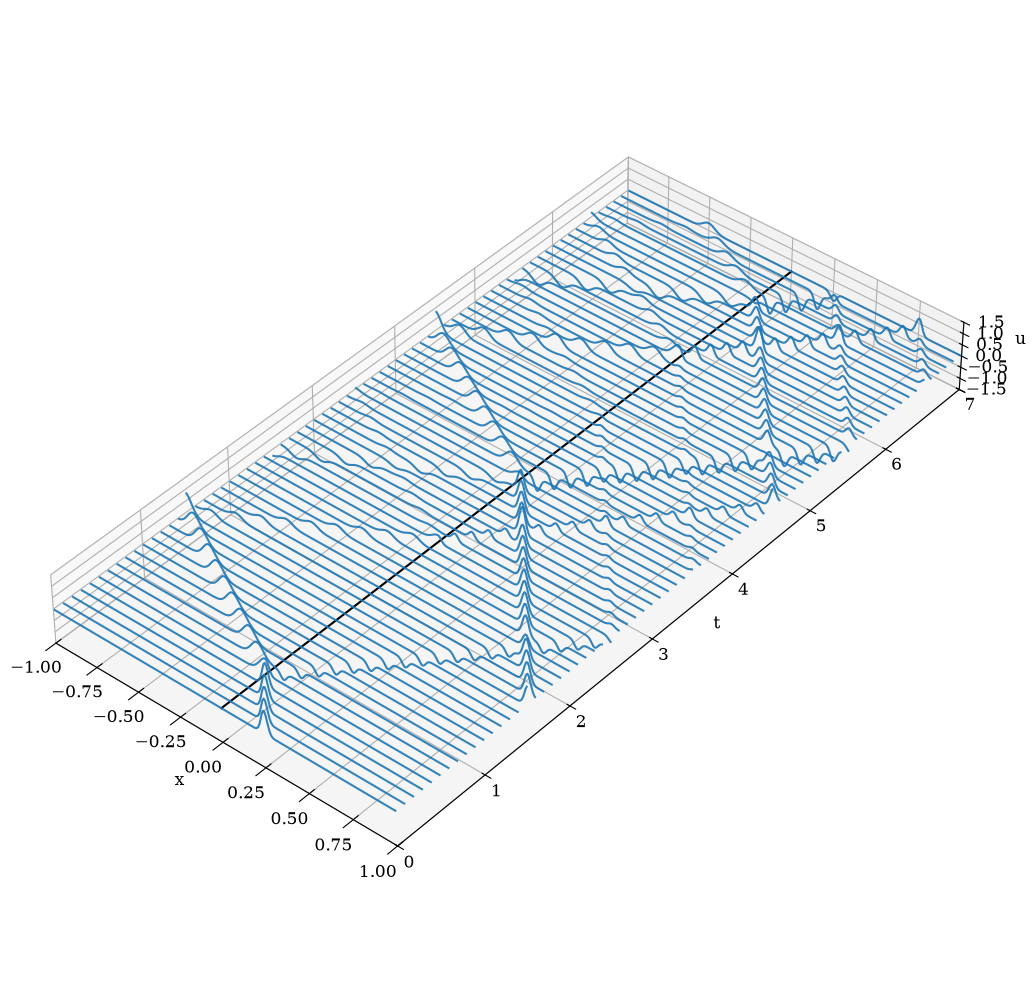
Make animation
import matplotlib.pyplot as plt
from matplotlib import animation
from matplotlib import rc
rc('animation', html='jshtml')

# First set up the figure, the axis, and the plot element we want to animate
fig = plt.figure()
ax = plt.axes(xlim=(-1, 1), ylim=(-1.1, 1.1))
line, = ax.plot([], [], 'r-', lw=2, label='u')
ax2 = ax.twinx()
speed, = ax2.plot(x,c,'k:',lw=1,label='c')
ax.legend(loc='upper left'), ax2.legend(loc='upper right')
ax.set_xlabel('x'); ax.set_ylabel('u'); ax2.set_ylabel('c')
plt.close();

# initialization function: plot the background of each frame
def init():
    line.set_data([], [])
    return line,

# animation function.  This is called sequentially
def animate(i):
    x, v = zip(*data[i])
    line.set_data(x, v)
    ax.set_title("t = "+str(tdata[i]))
    return line,

# call the animator.  blit=True means only re-draw the parts that have changed.
anim = animation.FuncAnimation(fig, animate, init_func=init, repeat=False,
                               frames=len(data), interval=50, blit=True)
# Save to file
try:
    anim.save('acoustics_1d.mp4', fps=20, extra_args=['-vcodec', 'libx264'])
except:
    print("Cannot save mp4 file")
# Use this for inline display with controls
animLoading...
The dotted line shows the speed function .
# Use this for inline display of movie
#from IPython.display import HTML
#HTML(anim.to_html5_video())